> ## Documentation Index
> Fetch the complete documentation index at: https://docs.5x.co/llms.txt
> Use this file to discover all available pages before exploring further.
# Datasets & data exploration
> Explore datasets, write custom SQL queries, and understand your data structure with powerful data exploration tools
**Focus:** Learn how to explore your data effectively, write custom SQL queries, and understand data quality and structure to build better visualizations.
## Data exploration overview
Data exploration is the foundation of effective analytics. Before creating charts and dashboards, you need to understand your data - its structure, quality, relationships, and patterns. 5X Business Intelligence provides powerful tools for exploring datasets and writing custom SQL queries.
### **Why data exploration matters**
**Ensure accuracy**
Understanding data quality helps you build reliable visualizations and avoid misleading insights.
**Find insights**
Explore data to discover patterns, trends, and relationships that inform your analysis.
**Improve performance**
Understanding data structure helps you write efficient queries and optimize chart performance.
**Better analysis**
Thorough data exploration leads to more accurate analysis and better business decisions.
## Dataset management
### **What are datasets?**
Datasets in 5X Business Intelligence are logical representations of your data sources that serve as the foundation for all analytics and visualizations. They act as a bridge between your raw data warehouse tables and the charts, dashboards, and reports you create.
**Key characteristics of datasets:**
* **Logical abstraction** - Represent tables, views, or custom SQL queries from your data warehouse
* **Metadata rich** - Include schema information, column types, relationships, and business context
* **Performance optimized** - Include caching and query optimization features
* **Business focused** - Organized and documented for business users
**Types of datasets:**
* **Physical tables** - Direct representation of warehouse tables
* **Views** - Pre-defined SQL views from your data warehouse
* **Custom SQL** - Virtual datasets created from custom SQL queries
* **Metrics layer datasets** - Business-friendly views from 5X's metrics layer
### **Creating datasets**
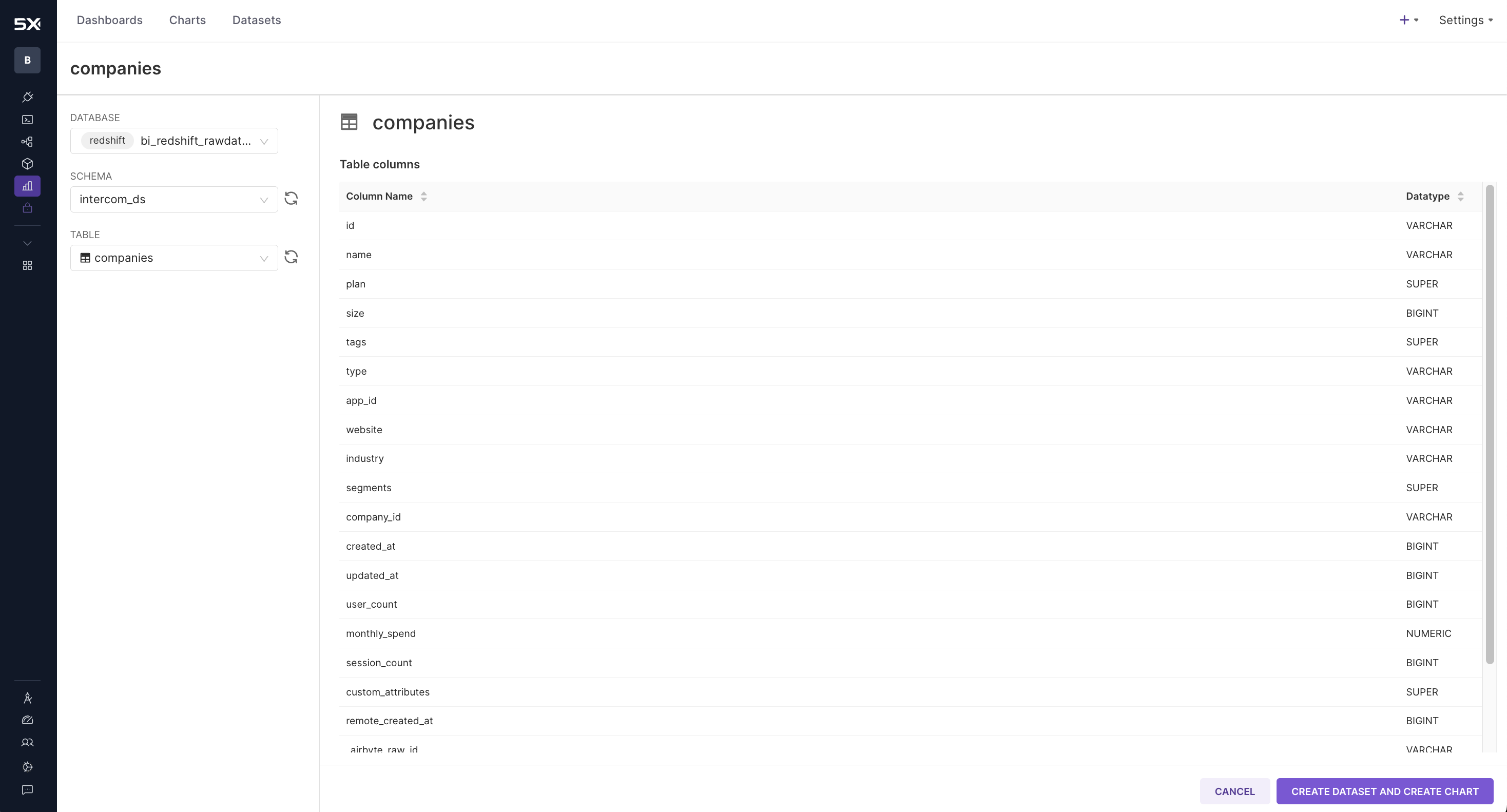
**From App Connections:**
1. **Navigate to datasets** - Go to the datasets section in Business Intelligence
2. **Select data source** - Choose from your configured App Connections
3. **Browse tables** - Explore available tables and views
4. **Create dataset** - Click "Create Dataset" for your selected table
5. **Configure settings** - Set name, description, and basic properties
 **From SQL Lab:**
1. **Access SQL Lab** - Navigate to SQL Lab from the Business Intelligence menu
**From SQL Lab:**
1. **Access SQL Lab** - Navigate to SQL Lab from the Business Intelligence menu
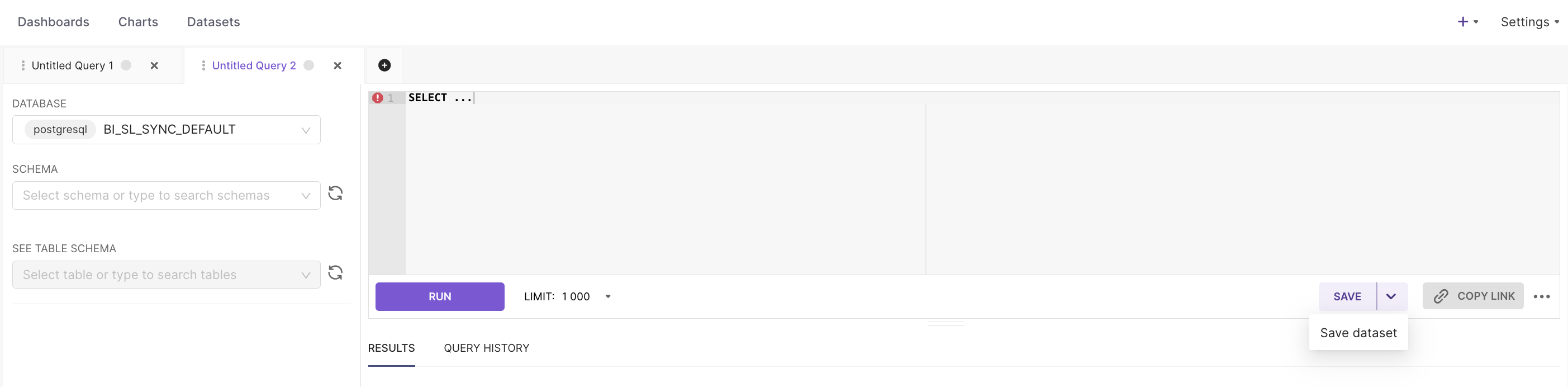
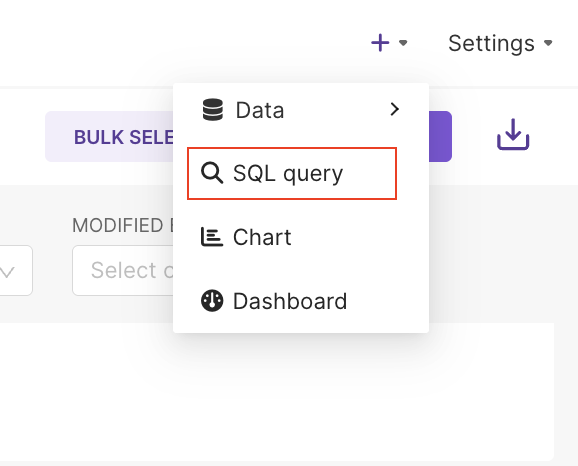 2. **Write custom query** - Create SQL query in SQL Lab
3. **Test and validate** - Execute query to verify results
4. **Save as dataset** - Use "Save as Dataset" option
5. **Configure metadata** - Add business context and documentation
2. **Write custom query** - Create SQL query in SQL Lab
3. **Test and validate** - Execute query to verify results
4. **Save as dataset** - Use "Save as Dataset" option
5. **Configure metadata** - Add business context and documentation
 ### **Dataset best practices**
**Descriptive names**
Use consistent, descriptive naming conventions that reflect business purpose and data source.
**Business context**
Include detailed descriptions, business rules, and usage guidelines for each dataset.
**Organization**
Use tags and categories to organize datasets for easy discovery and management.
**Access control**
Implement appropriate security policies and row-level security where needed.
## SQL Lab
### **Introduction to SQL Lab**
SQL Lab is 5X Business Intelligence's powerful query interface that allows you to write and execute custom SQL queries directly against your data warehouse.
**Key features:**
* **Full SQL support** - Write complex queries with joins, subqueries, and advanced functions
* **Query history** - Track and reuse previous queries
* **Query sharing** - Share queries with team members
* **Result export** - Export query results in various formats
* **Query optimization** - Built-in suggestions for query performance
### **Writing effective queries**
**Query structure best practices:**
```sql theme={null}
-- Example: Well-structured query with clear formatting
SELECT
DATE_TRUNC('month', order_date) AS month,
region,
COUNT(*) AS order_count,
SUM(order_amount) AS total_revenue,
AVG(order_amount) AS avg_order_value
FROM orders
WHERE order_date >= '2024-01-01'
AND order_status = 'completed'
GROUP BY 1, 2
ORDER BY month DESC, total_revenue DESC
LIMIT 100;
```
**Query optimization tips:**
* **Use appropriate filters** - Limit data with WHERE clauses
* **Select only needed columns** - Avoid SELECT \* for better performance
* **Use proper indexing** - Structure queries to leverage database indexes
* **Limit result sets** - Use LIMIT to control output size
### **Advanced SQL features**
**Window functions:**
```sql theme={null}
-- Example: Using window functions for advanced analytics
SELECT
customer_id,
order_date,
order_amount,
SUM(order_amount) OVER (
PARTITION BY customer_id
ORDER BY order_date
ROWS BETWEEN UNBOUNDED PRECEDING AND CURRENT ROW
) AS running_total,
ROW_NUMBER() OVER (
PARTITION BY customer_id
ORDER BY order_date DESC
) AS order_rank
FROM orders;
```
**Common table expressions (CTEs):**
```sql theme={null}
-- Example: Using CTEs for complex analysis
WITH monthly_sales AS (
SELECT
DATE_TRUNC('month', order_date) AS month,
SUM(order_amount) AS total_sales
FROM orders
GROUP BY 1
),
sales_growth AS (
SELECT
month,
total_sales,
LAG(total_sales) OVER (ORDER BY month) AS prev_month_sales,
(total_sales - LAG(total_sales) OVER (ORDER BY month)) /
LAG(total_sales) OVER (ORDER BY month) * 100 AS growth_rate
FROM monthly_sales
)
SELECT * FROM sales_growth;
```
## Troubleshooting
### **Common exploration issues**
**Possible causes:**
* Insufficient permissions for dataset access
* App connection configuration problems
* Data source connectivity issues
* Row-level security restrictions
**Solutions:**
* Verify user permissions and roles
* Check App Connection settings
* Test data source connectivity
* Review security policies
**Possible causes:**
* Inefficient query structure
* Large dataset volumes
* Missing database indexes
* Complex calculations or joins
**Solutions:**
* Optimize query structure and logic
* Use appropriate filters and limits
* Check database indexing strategy
* Consider data aggregation approaches
***
**Connect to data**
Learn how to set up App Connections to access your data sources.
**Create visualizations**
Use your data exploration insights to build compelling charts and dashboards.
### **Dataset best practices**
**Descriptive names**
Use consistent, descriptive naming conventions that reflect business purpose and data source.
**Business context**
Include detailed descriptions, business rules, and usage guidelines for each dataset.
**Organization**
Use tags and categories to organize datasets for easy discovery and management.
**Access control**
Implement appropriate security policies and row-level security where needed.
## SQL Lab
### **Introduction to SQL Lab**
SQL Lab is 5X Business Intelligence's powerful query interface that allows you to write and execute custom SQL queries directly against your data warehouse.
**Key features:**
* **Full SQL support** - Write complex queries with joins, subqueries, and advanced functions
* **Query history** - Track and reuse previous queries
* **Query sharing** - Share queries with team members
* **Result export** - Export query results in various formats
* **Query optimization** - Built-in suggestions for query performance
### **Writing effective queries**
**Query structure best practices:**
```sql theme={null}
-- Example: Well-structured query with clear formatting
SELECT
DATE_TRUNC('month', order_date) AS month,
region,
COUNT(*) AS order_count,
SUM(order_amount) AS total_revenue,
AVG(order_amount) AS avg_order_value
FROM orders
WHERE order_date >= '2024-01-01'
AND order_status = 'completed'
GROUP BY 1, 2
ORDER BY month DESC, total_revenue DESC
LIMIT 100;
```
**Query optimization tips:**
* **Use appropriate filters** - Limit data with WHERE clauses
* **Select only needed columns** - Avoid SELECT \* for better performance
* **Use proper indexing** - Structure queries to leverage database indexes
* **Limit result sets** - Use LIMIT to control output size
### **Advanced SQL features**
**Window functions:**
```sql theme={null}
-- Example: Using window functions for advanced analytics
SELECT
customer_id,
order_date,
order_amount,
SUM(order_amount) OVER (
PARTITION BY customer_id
ORDER BY order_date
ROWS BETWEEN UNBOUNDED PRECEDING AND CURRENT ROW
) AS running_total,
ROW_NUMBER() OVER (
PARTITION BY customer_id
ORDER BY order_date DESC
) AS order_rank
FROM orders;
```
**Common table expressions (CTEs):**
```sql theme={null}
-- Example: Using CTEs for complex analysis
WITH monthly_sales AS (
SELECT
DATE_TRUNC('month', order_date) AS month,
SUM(order_amount) AS total_sales
FROM orders
GROUP BY 1
),
sales_growth AS (
SELECT
month,
total_sales,
LAG(total_sales) OVER (ORDER BY month) AS prev_month_sales,
(total_sales - LAG(total_sales) OVER (ORDER BY month)) /
LAG(total_sales) OVER (ORDER BY month) * 100 AS growth_rate
FROM monthly_sales
)
SELECT * FROM sales_growth;
```
## Troubleshooting
### **Common exploration issues**
**Possible causes:**
* Insufficient permissions for dataset access
* App connection configuration problems
* Data source connectivity issues
* Row-level security restrictions
**Solutions:**
* Verify user permissions and roles
* Check App Connection settings
* Test data source connectivity
* Review security policies
**Possible causes:**
* Inefficient query structure
* Large dataset volumes
* Missing database indexes
* Complex calculations or joins
**Solutions:**
* Optimize query structure and logic
* Use appropriate filters and limits
* Check database indexing strategy
* Consider data aggregation approaches
***
**Connect to data**
Learn how to set up App Connections to access your data sources.
**Create visualizations**
Use your data exploration insights to build compelling charts and dashboards.