> ## Documentation Index
> Fetch the complete documentation index at: https://docs.5x.co/llms.txt
> Use this file to discover all available pages before exploring further.
# Overview
> Natural language interface for querying data and generating insights from your Metrics Store
**Focus:** Learn how 5X Conversational AI makes data accessible to everyone through natural language conversations, enabling users to get insights without writing SQL or building dashboards.
## What is Conversational AI?
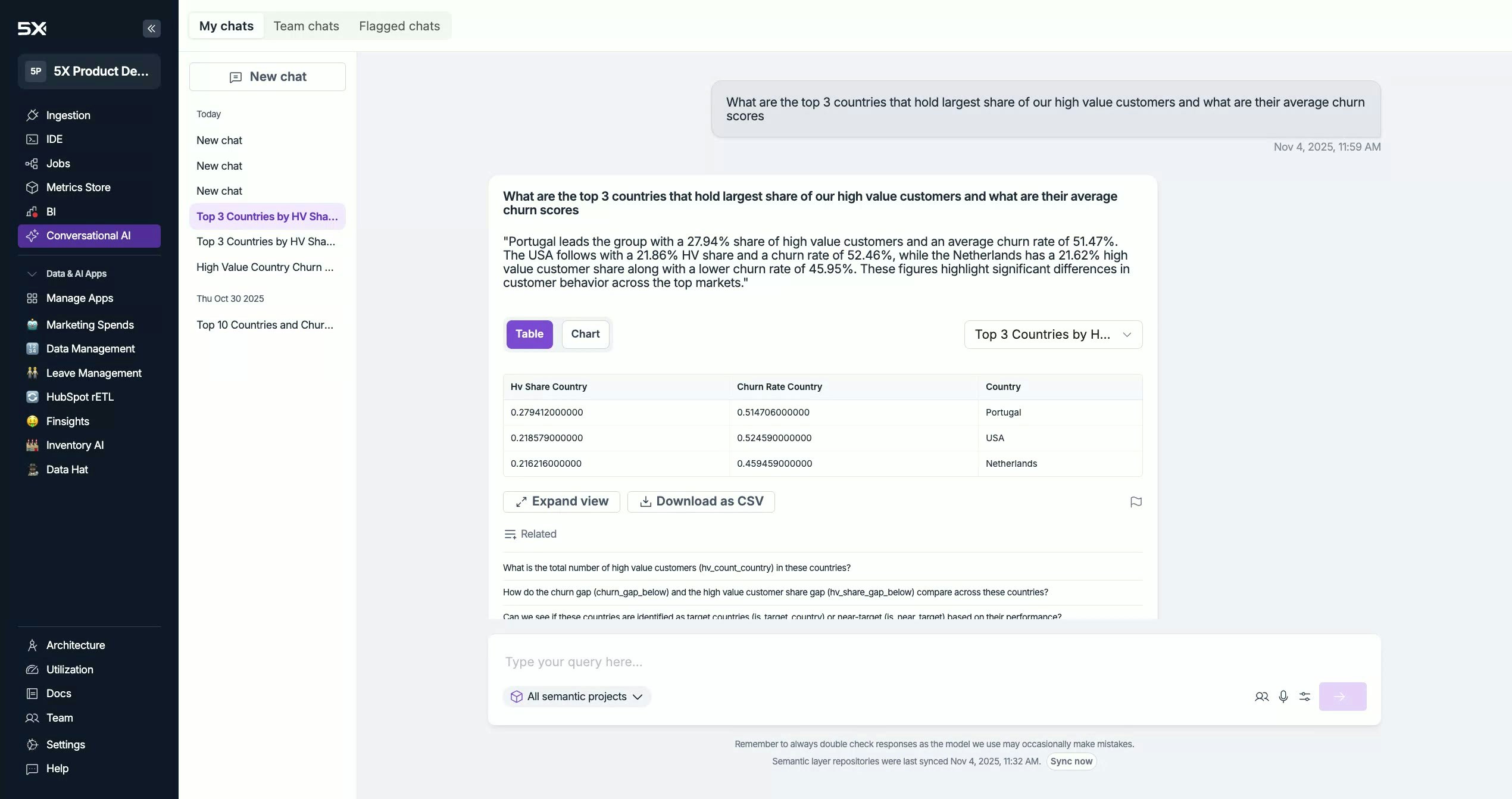
The Conversational AI feature lets business and data users ask questions like:
* "Top 10 countries by high-value customers and their average churn score?"
* "What's revenue growth QoQ by region?"
It discovers relevant metrics from your Metrics Store and automatically runs the appropriate warehouse queries.
## Access & Navigation
Open the left navigation bar in the 5X Platform.
Click Conversational AI.
You'll land on New Chat, with tabs for My Chats, Team Chats, and Flagged Chats.
 ## Start a New Chat
* Type your question in English in the input box.
* Press Enter to run the query.
* Typical response time: \~10–15 seconds (may be faster when cached).
## Project Selection (Metrics Store)
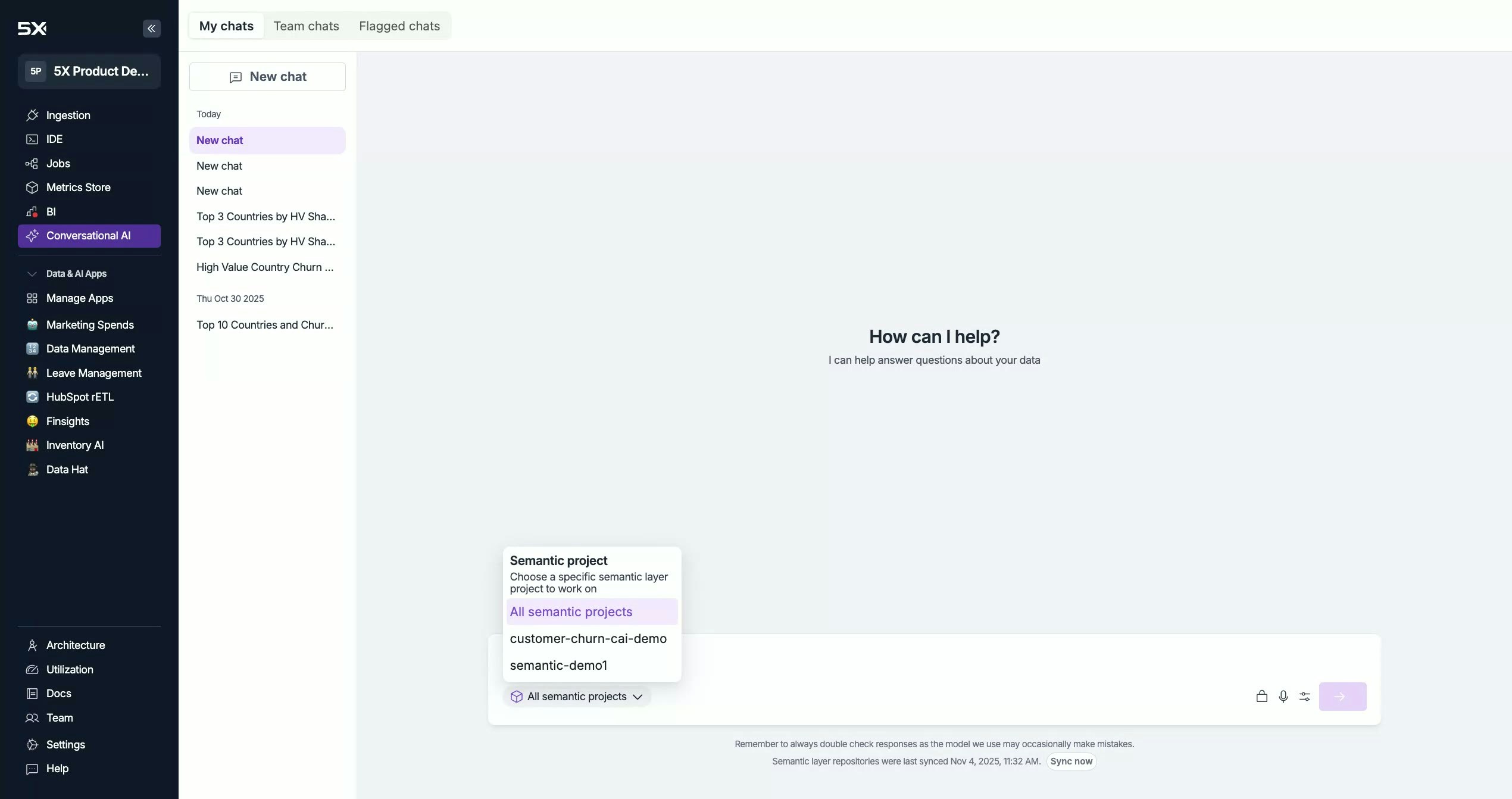
Choose which Metrics project(s) to query:
* **All Projects** (recommended if you're unsure which project has the right metric)
* The system matches your question to the best project before execution.
* **Specific Project** (faster when you know exactly where the metrics live)
If you know the project (e.g., Sales Metrics), select it to reduce cross-project checks and speed up response.
## Start a New Chat
* Type your question in English in the input box.
* Press Enter to run the query.
* Typical response time: \~10–15 seconds (may be faster when cached).
## Project Selection (Metrics Store)
Choose which Metrics project(s) to query:
* **All Projects** (recommended if you're unsure which project has the right metric)
* The system matches your question to the best project before execution.
* **Specific Project** (faster when you know exactly where the metrics live)
If you know the project (e.g., Sales Metrics), select it to reduce cross-project checks and speed up response.
 ## Voice Input (Mic)
Click the mic icon to speak your question instead of typing.
Make sure your browser permissions allow microphone access.
## Sync Now (Metadata Refresh)
If a developer just added/updated metrics in the Metrics Store and you don't see them yet:
* Click Sync Now to force a metadata refresh.
* Conversational AI ingests the latest metadata within \~5 minutes.
## Voice Input (Mic)
Click the mic icon to speak your question instead of typing.
Make sure your browser permissions allow microphone access.
## Sync Now (Metadata Refresh)
If a developer just added/updated metrics in the Metrics Store and you don't see them yet:
* Click Sync Now to force a metadata refresh.
* Conversational AI ingests the latest metadata within \~5 minutes.