> ## Documentation Index
> Fetch the complete documentation index at: https://docs.5x.co/llms.txt
> Use this file to discover all available pages before exploring further.
# Overview
> Visual workflow automation with dependency tracking and monitoring - orchestrate your data pipelines with ease
**Focus:** Understand how 5X Jobs automates your data workflows with visual pipeline building, flexible scheduling, and comprehensive monitoring.
5X Jobs is a visual workflow automation platform that automates your data workflows through drag-and-drop pipeline building. Create complex data pipelines with triggers, tasks, and dependencies - all managed through an intuitive no-code interface that handles scheduling, monitoring, and execution automatically.
 ## Key capabilities
### **Visual workflow builder**
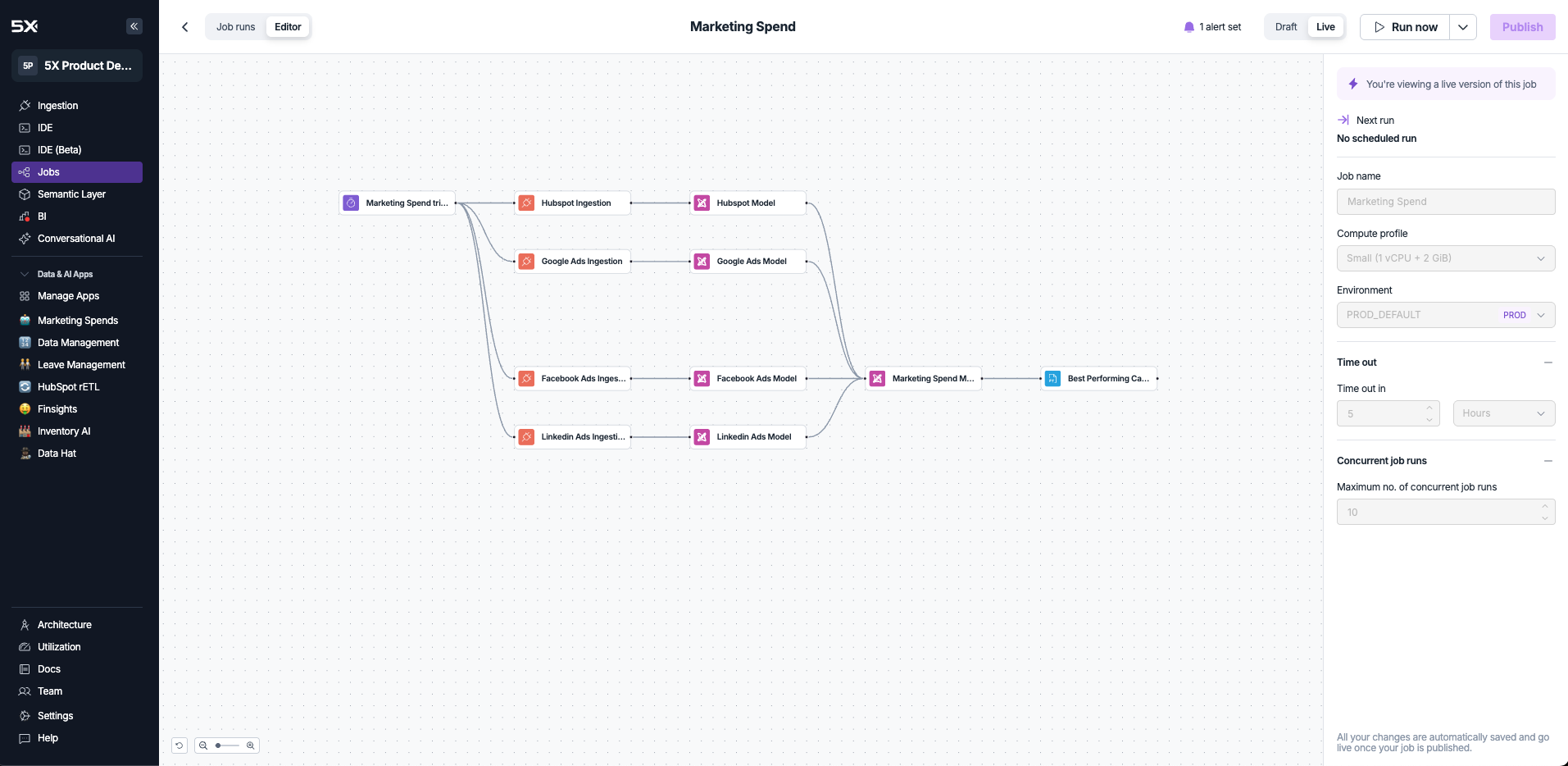
Create complex data pipelines using an intuitive drag-and-drop interface:
* **Trigger nodes** - Start workflows with manual, scheduled, webhook, or pull request triggers
* **Task nodes** - Execute data ingestion, dbt modeling, custom Python code, or parallel jobs
* **Dependency management** - Define execution order and parallel processing with visual connections
* **Real-time preview** - See your pipeline structure and flow before execution
### **Flexible scheduling options**
Choose how your jobs are triggered based on your workflow needs:
**On-demand execution**
Run jobs instantly with a single click for immediate processing.
**Use cases:**
* Testing and debugging workflows
* Ad-hoc data processing
* Emergency data updates
* Development and experimentation
**Time-based execution**
Automate jobs with precise scheduling intervals and timezone support.
**Features:**
* Intervals as frequent as 1 minute
* Daily, weekly, monthly schedules
* Custom CRON expressions
* Automatic timezone handling
**Event-driven execution**
Trigger jobs from external systems with secure authentication.
**Features:**
* Real-time pipeline activation
* Configurable access tokens
* Secure authentication
* Integration with external APIs
**GitHub CI/CD integration**
Automatically execute jobs when pull requests are created or updated.
**Features:**
* GitHub integration
* Automatic job execution on PR creation
* Draft pull request support
* CI/CD workflow automation
### **Comprehensive task automation**
Execute different types of work within your pipelines:
**Data ingestion:**
* Use the same 600+ connectors available in 5X Ingestion
* Seamlessly integrate data collection into your workflows
* Automatic dependency management with other pipeline steps
**dbt modeling:**
* Execute dbt runs with configurable commands and parameters
* Support for multiple dbt versions (1.6.18, 1.7.19, 1.8.9, 1.9.10)
* Support for multiple repositories and branches
* Integration with dbt documentation generation
* Deferral support for comparing changes across environments
**Custom Python code:**
* Run Python scripts from GitHub repositories
* Support for Python versions 3.8.19 through 3.12.4
* Dependency management with requirements files
* Environment variable and secret injection
**Parallel job execution:**
* Execute other jobs as sub-workflows
* Enable complex pipeline orchestration and reuse
* Hierarchical job management across your workspace
### **Real-time monitoring and management**
Track job execution with comprehensive visibility:
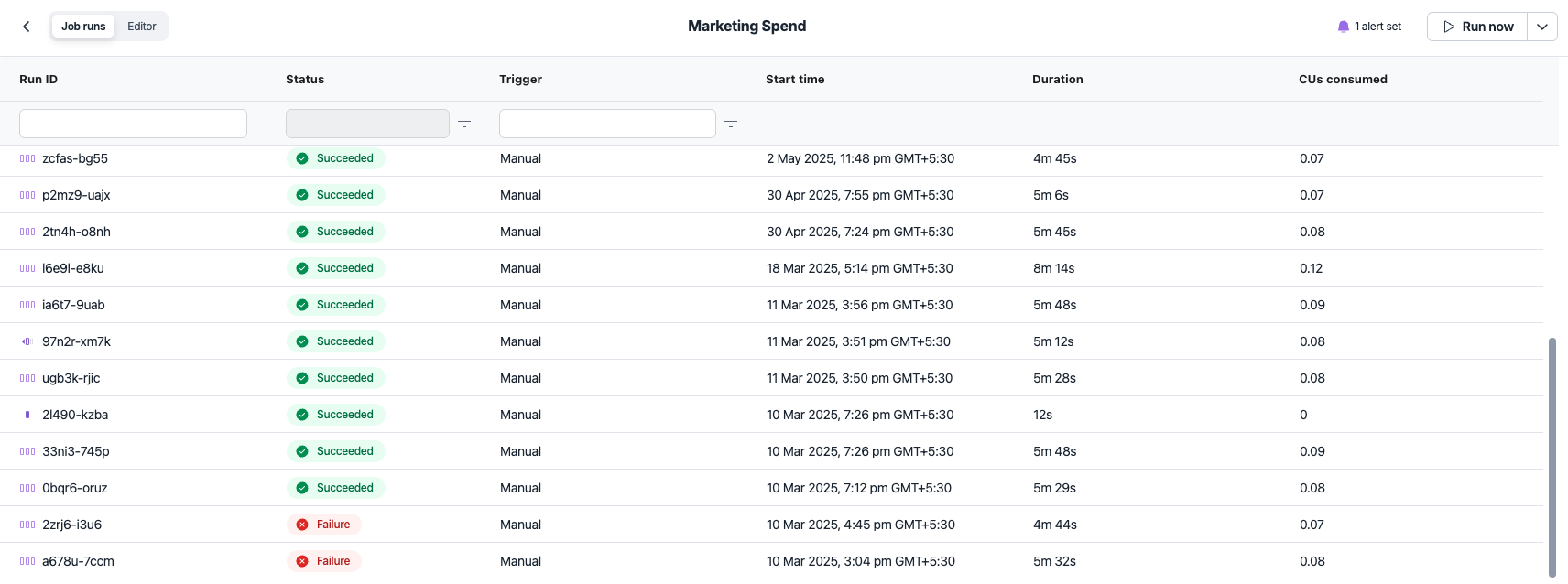
* **Job run history** - View all past executions with status, duration, and resource usage
* **Real-time status** - Monitor active jobs with live updates
* **Detailed logs** - Access execution logs for debugging and troubleshooting
* **Performance metrics** - Track compute usage, execution time, and resource consumption
* **Draft management** - Develop and test changes before publishing to production
## Key capabilities
### **Visual workflow builder**
Create complex data pipelines using an intuitive drag-and-drop interface:
* **Trigger nodes** - Start workflows with manual, scheduled, webhook, or pull request triggers
* **Task nodes** - Execute data ingestion, dbt modeling, custom Python code, or parallel jobs
* **Dependency management** - Define execution order and parallel processing with visual connections
* **Real-time preview** - See your pipeline structure and flow before execution
### **Flexible scheduling options**
Choose how your jobs are triggered based on your workflow needs:
**On-demand execution**
Run jobs instantly with a single click for immediate processing.
**Use cases:**
* Testing and debugging workflows
* Ad-hoc data processing
* Emergency data updates
* Development and experimentation
**Time-based execution**
Automate jobs with precise scheduling intervals and timezone support.
**Features:**
* Intervals as frequent as 1 minute
* Daily, weekly, monthly schedules
* Custom CRON expressions
* Automatic timezone handling
**Event-driven execution**
Trigger jobs from external systems with secure authentication.
**Features:**
* Real-time pipeline activation
* Configurable access tokens
* Secure authentication
* Integration with external APIs
**GitHub CI/CD integration**
Automatically execute jobs when pull requests are created or updated.
**Features:**
* GitHub integration
* Automatic job execution on PR creation
* Draft pull request support
* CI/CD workflow automation
### **Comprehensive task automation**
Execute different types of work within your pipelines:
**Data ingestion:**
* Use the same 600+ connectors available in 5X Ingestion
* Seamlessly integrate data collection into your workflows
* Automatic dependency management with other pipeline steps
**dbt modeling:**
* Execute dbt runs with configurable commands and parameters
* Support for multiple dbt versions (1.6.18, 1.7.19, 1.8.9, 1.9.10)
* Support for multiple repositories and branches
* Integration with dbt documentation generation
* Deferral support for comparing changes across environments
**Custom Python code:**
* Run Python scripts from GitHub repositories
* Support for Python versions 3.8.19 through 3.12.4
* Dependency management with requirements files
* Environment variable and secret injection
**Parallel job execution:**
* Execute other jobs as sub-workflows
* Enable complex pipeline orchestration and reuse
* Hierarchical job management across your workspace
### **Real-time monitoring and management**
Track job execution with comprehensive visibility:
* **Job run history** - View all past executions with status, duration, and resource usage
* **Real-time status** - Monitor active jobs with live updates
* **Detailed logs** - Access execution logs for debugging and troubleshooting
* **Performance metrics** - Track compute usage, execution time, and resource consumption
* **Draft management** - Develop and test changes before publishing to production
 ### **Intelligent alerting system**
Stay informed about your job execution with comprehensive notifications:
* **Success/failure alerts** - Get notified when jobs complete or fail
* **Multiple channels** - Email and Slack integration
* **Granular control** - Set alerts at job level or workspace level
* **Real-time delivery** - Immediate notifications for critical events
### **Environment and resource management**
Run jobs across different environments with proper isolation:
* **Environment configuration** - Define separate environments for development, staging, and production
* **App connection integration** - Link environments to specific warehouse connections
* **Environment variables** - Manage secrets and configuration across environments
* **Compute profiles** - Configure resource allocation per job execution
* **Concurrent execution control** - Limit parallel job runs to manage resource usage
## Getting started
Ready to automate your first data workflow? Here's how to get started:
**Set up app connections**
Configure your data warehouse connection and environment before creating jobs.
**Build a workflow**
Learn how to create triggers, add tasks, and build your first automated pipeline.
***
### **Intelligent alerting system**
Stay informed about your job execution with comprehensive notifications:
* **Success/failure alerts** - Get notified when jobs complete or fail
* **Multiple channels** - Email and Slack integration
* **Granular control** - Set alerts at job level or workspace level
* **Real-time delivery** - Immediate notifications for critical events
### **Environment and resource management**
Run jobs across different environments with proper isolation:
* **Environment configuration** - Define separate environments for development, staging, and production
* **App connection integration** - Link environments to specific warehouse connections
* **Environment variables** - Manage secrets and configuration across environments
* **Compute profiles** - Configure resource allocation per job execution
* **Concurrent execution control** - Limit parallel job runs to manage resource usage
## Getting started
Ready to automate your first data workflow? Here's how to get started:
**Set up app connections**
Configure your data warehouse connection and environment before creating jobs.
**Build a workflow**
Learn how to create triggers, add tasks, and build your first automated pipeline.
***