

Alert setup overview
5X provides flexible alert configuration to keep you informed about your data pipeline status. You can set up alerts in two ways:From connector listing
Quick connector alertsSet up alerts directly from the ingestion dashboard for specific connectors
From settings panel
Centralized managementConfigure and manage all alerts from a single location in Settings
Setting up alerts
Method 1: From connector listing page
The quickest way to set up alerts for a specific connector is directly from the ingestion dashboard: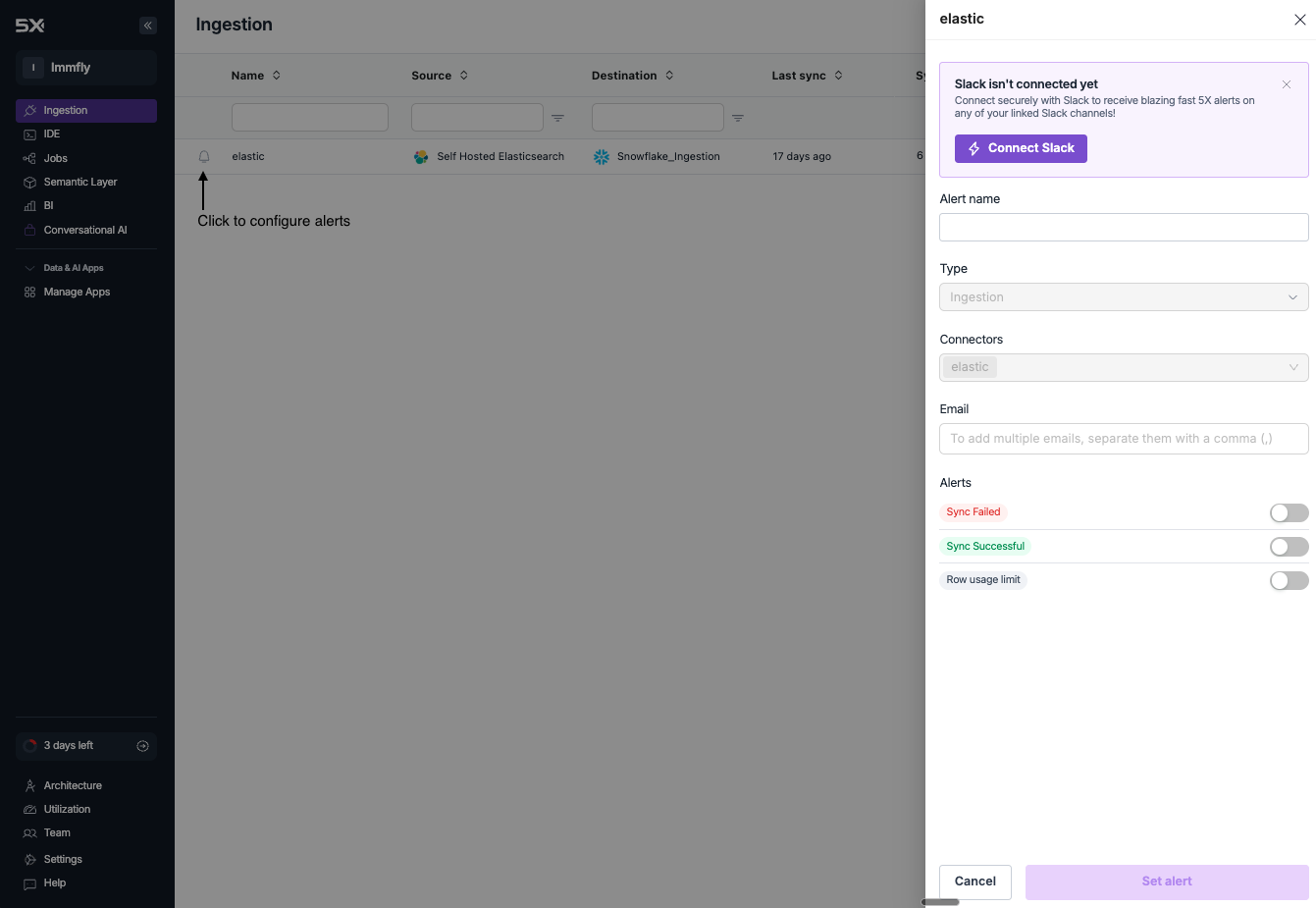
1
Navigate to ingestion dashboard
Go to Ingestion in the main navigation to view your connectors
2
Click the alert icon
Next to each connector, click the icon to open the alert configuration dialog
3
Configure alert settings
Set up your alert preferences including:
- Alert name
- Connector selection (pre-selected)
- Alert types (Sync Failed, Sync Successful, Row usage limit)
- Delivery channels (Slack and/or Email)
4
Save your alert
Click Set alert to activate the alert for that specific connector
Method 2: From settings panel
For comprehensive alert management across all connectors: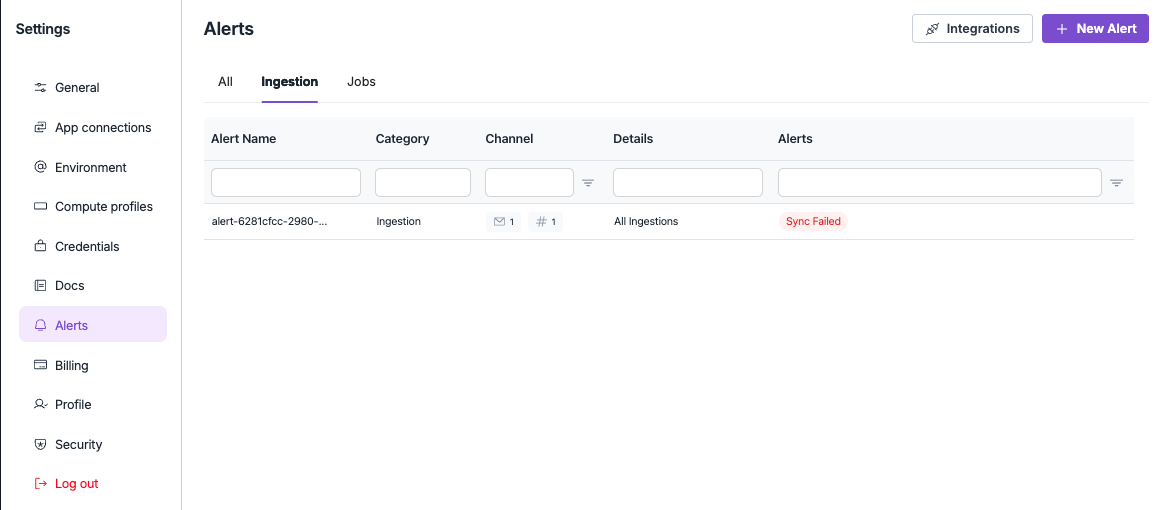
1
Access settings
Navigate to Settings from the main navigation, then click Alerts
2
Create new alert
Click the New Alert button to open the alert configuration dialog
3
Configure alert details
Set up your alert with the following options:
- Alert name - Descriptive name for your alert
- Type - Select “Ingestion” for data pipeline alerts
- Connectors - Choose which connectors to monitor
- Channel - Select Slack channels for notifications
- Email - Add email addresses for notifications
- Alert types - Choose specific alert conditions
4
Save and activate
Click Set alert to create and activate your new alert
Editing existing alerts
To modify an existing alert from the Settings panel:1
Find your alert
In Settings → Alerts, locate the alert you want to modify
2
Click to edit
Click on the alert name or row to open the edit dialog
3
Update settings
Modify any alert settings including connectors, channels, or alert types
4
Save changes
Click Update alert to save your changes
Alert types
Configure different alert types based on your monitoring needs:- Sync Failed
- Sync Successful
- Row usage limit
Get notified when syncs failReceive immediate notifications when data synchronization fails for your connectors.When this alert triggers:
- Sync encounters an error and cannot complete
- Connection to data source fails
- Authentication or permission issues occur
- Data transformation errors during processing
- Set up for all critical connectors
- Route to appropriate team channels
- Include escalation for repeated failures
Alert configuration best practices
Alert organization
Structure your alerts for maximum effectiveness:Connector-specific alerts
Focused monitoringSet up dedicated alerts for critical connectors with specific requirements
Team-based routing
Proper escalationRoute alerts to appropriate teams based on connector ownership
Severity levels
PrioritizationUse different channels for different alert severities
Noise reduction
Alert fatigueAvoid overwhelming teams with too many notifications
Alert naming conventions
Use consistent naming for better organization: Naming structure:- Environment prefix -
[PROD],[STAGING],[DEV] - Connector name - Clear identifier for the data source
- Alert type -
Sync Failed,Usage Limit, etc. - Team identifier - Responsible team or department
[PROD] Salesforce - Sync Failed - Sales Team[PROD] PostgreSQL - Usage Limit - Data Engineering[STAGING] BigQuery - Sync Successful - QA Team